Threads, Async, Await, and Event Loops in AWS Lambda
By Oleksandr Andrushchenko — Published on — Modified on
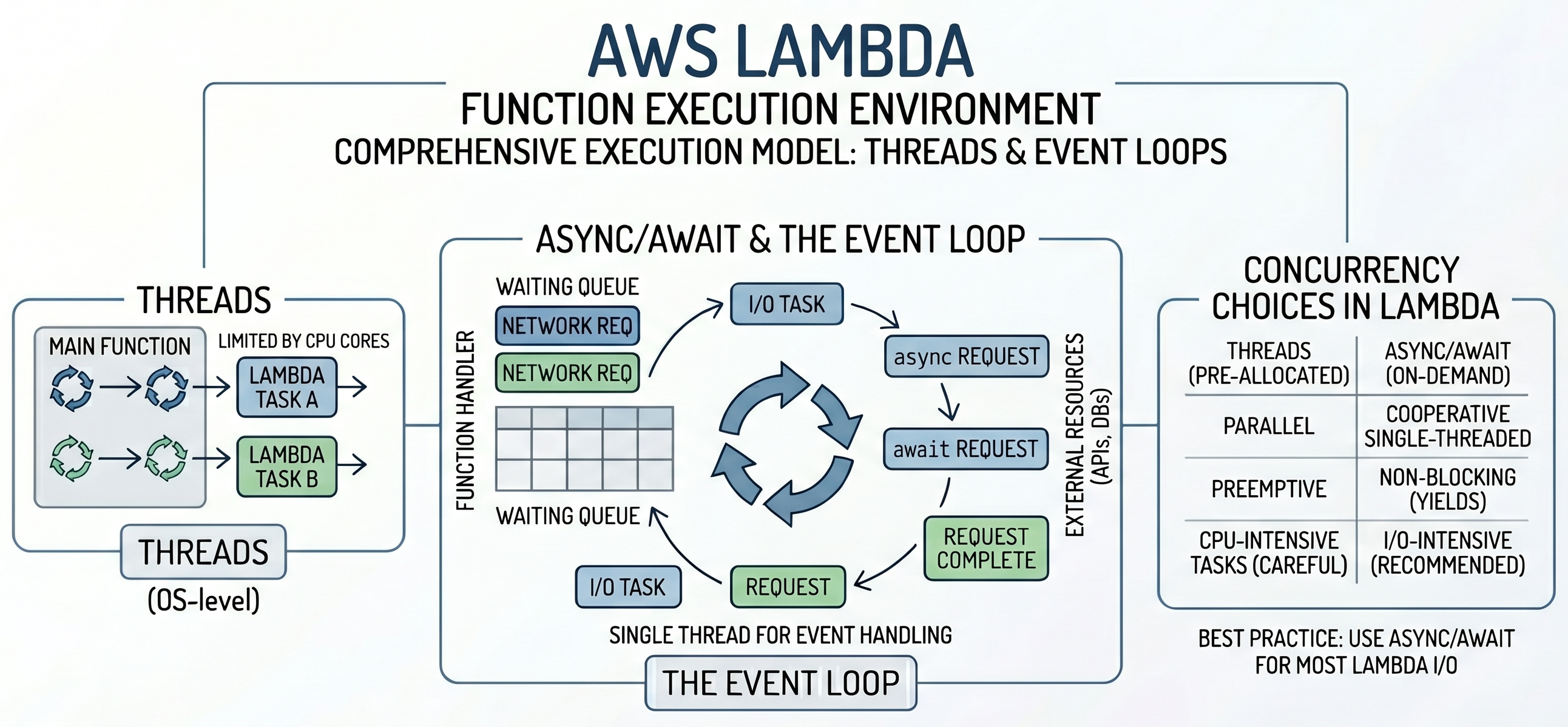
AWS Lambda already gives you horizontal scalability by creating more execution environments when more events arrive. But inside one Lambda invocation, your Python code may still spend a lot of time waiting for APIs, databases, S3, DynamoDB, Redis, or other services.
This article explains how threads, async, await, and the event loop behave inside AWS Lambda, when they help, when they do not help, and how to use them safely in real serverless applications.
Table of Contents
- AWS Lambda Execution Model
- Concurrency Inside One Lambda Invocation
- Threads in AWS Lambda
- Async and Await in AWS Lambda
- Event Loop in Lambda
- Threads vs Async in Lambda
- FastAPI and Mangum in Lambda
- Real-World Examples
- Common Mistakes
- Production Recommendations
- Conclusion
AWS Lambda Execution Model
One Invocation Per Execution Environment
An AWS Lambda function runs inside an execution environment. When an event arrives, Lambda invokes your handler. In Python, the handler is usually a normal synchronous function such as lambda_handler(event, context). The invocation runs until the handler returns a response, exits, or times out.
def lambda_handler(event, context):
    return {
        "statusCode": 200,
        "body": "Hello from Lambda"
    }
For one execution environment, you should think about one active invocation at a time. If more requests arrive concurrently, AWS Lambda scales by creating more execution environments instead of running many unrelated invocations inside the same environment.
Lambda Already Scales Horizontally
Lambda concurrency is not the same as Python concurrency. AWS Lambda scales the function by running multiple execution environments. Python threads or async do not make Lambda itself scale horizontally. They only help your code do more work inside a single invocation.
Request 1 -> Lambda environment 1
Request 2 -> Lambda environment 2
Request 3 -> Lambda environment 3
Request 4 -> Lambda environment 4
This distinction is important. If your Lambda function receives 1,000 API Gateway requests at the same time, AWS can run many Lambda environments. If one invocation needs to call three APIs, threads or async can help that single invocation call those APIs concurrently.
Cold Starts and Warm Starts
A cold start happens when Lambda creates a new execution environment. Python imports modules, initializes global variables, creates clients, and prepares the runtime. A warm start happens when Lambda reuses an existing environment for another invocation.
Cold start:
Create environment
Import modules
Initialize global objects
Run handler


Warm start:
Reuse environment
Run handler again
Global variables may survive between warm invocations. This is useful for reusing SDK clients, database pools, configuration, and sometimes event loop-related objects. However, you should never assume a warm start is guaranteed.
Memory and CPU Allocation
In Lambda, memory configuration also affects available CPU. Increasing memory can improve CPU-bound work, import speed, compression, JSON processing, cryptography, and some network-heavy workloads. This means performance tuning is not only about code; Lambda memory size can change execution speed and cost.
Rule of thumb: for IO-heavy Lambda functions, use threads or async to reduce waiting time. For CPU-heavy Lambda functions, test higher memory settings or move the work to a more appropriate compute model.
Concurrency Inside One Lambda Invocation
Why Invocation-Level Concurrency Matters
Inside one Lambda invocation, code can still be slow if it waits for multiple external operations sequentially. For example, an API Lambda may need to fetch a user profile, order history, permissions, and feature flags before returning a response.
Sequential flow:

Get user       300 ms
Get orders     300 ms
Get payments   300 ms

Total: about 900 ms
If these operations are independent, they can be performed concurrently.
Concurrent flow:

Get user       300 ms
Get orders     300 ms
Get payments   300 ms

Total: about 300 ms
This matters in Lambda because duration affects latency and cost. Reducing a function from 900 ms to 300 ms can make the system faster and cheaper, assuming the added complexity is justified.
IO-Bound vs CPU-Bound Work
IO-bound work spends most of its time waiting for external systems. Examples include HTTP calls, DynamoDB requests, S3 operations, Redis calls, database queries, and queue interactions. Threads and async can help because they allow other work to continue while one operation waits.
CPU-bound work spends most of its time using the processor. Examples include image processing, compression, encryption, large JSON transformations, heavy calculations, and machine learning inference. Threads and async are usually not the best tools for CPU-heavy Python code, especially because of the GIL in standard CPython.
| Workload | Examples | Good Lambda Concurrency Option |
|---|---|---|
| IO-bound | HTTP APIs, S3, DynamoDB, Redis, SQL queries | Threads or async |
| CPU-bound | Image processing, compression, heavy calculations | More memory/CPU, multiprocessing, worker service, external compute |
| Mixed | Fetch data, transform it, store result | Measure bottleneck first |
Threads in AWS Lambda
How Threads Work in Lambda
Threads run multiple execution paths inside the same Lambda process. They are useful when your code uses blocking libraries such as boto3, requests, traditional SQL drivers, or blocking SDKs.
When one thread waits for a network response, another thread can continue. This can reduce the total duration of one Lambda invocation when several independent blocking operations need to happen.
Lambda invocation
  |
ThreadPoolExecutor
  |
+-------------+-------------+-------------+
|             |             |
API call      S3 call       DynamoDB call
ThreadPoolExecutor Example
Use ThreadPoolExecutor instead of manually creating many threads. It limits concurrency and keeps the code easier to control.
from concurrent.futures import ThreadPoolExecutor
import requests

def fetch_json(url):
    response = requests.get(url, timeout=5)
    response.raise_for_status()
    return response.json()

def lambda_handler(event, context):
    urls = [
        "https://api.example.com/user",
        "https://api.example.com/orders",
        "https://api.example.com/payments",
    ]

    with ThreadPoolExecutor(max_workers=3) as executor:
        results = list(executor.map(fetch_json, urls))

    return {
        "statusCode": 200,
        "body": results,
    }
This can be much faster than calling each URL sequentially if the APIs are independent and most time is spent waiting for the network.
Threads with boto3
boto3 is synchronous and blocking. If you need to perform multiple independent AWS SDK calls inside one Lambda invocation, threads can be a practical option.
from concurrent.futures import ThreadPoolExecutor
import boto3

s3 = boto3.client("s3")

def get_object_text(bucket, key):
    response = s3.get_object(Bucket=bucket, Key=key)
    return response["Body"].read().decode("utf-8")

def lambda_handler(event, context):
    objects = [
        ("my-bucket", "files/a.txt"),
        ("my-bucket", "files/b.txt"),
        ("my-bucket", "files/c.txt"),
    ]

    with ThreadPoolExecutor(max_workers=3) as executor:
        contents = list(
            executor.map(lambda item: get_object_text(item[0], item[1]), objects)
        )

    return {
        "statusCode": 200,
        "body": {
            "files": len(contents),
        },
    }
This pattern is useful for parallel S3 reads, multiple independent DynamoDB queries, or several independent API calls. Keep the worker count reasonable because each thread consumes memory and increases pressure on downstream systems.
When Threads Help
- You use blocking libraries such as
boto3,requests, or synchronous database drivers. - You have multiple independent IO operations inside one invocation.
- You want to improve existing synchronous Lambda code without rewriting everything to async.
- You need moderate concurrency, not thousands of concurrent tasks.
- You want simple parallelism for AWS SDK calls within one invocation.
Thread Limitations
Threads are useful, but they are not free. Too many threads can increase memory usage, scheduling overhead, and downstream pressure. Threads also share memory, which can create race conditions if multiple threads mutate the same data.
Important: threads do not make CPU-heavy Python code truly parallel in standard CPython because of the GIL. For CPU-heavy Lambda workloads, increasing memory, using multiprocessing carefully, using native libraries, or moving work to another service may be better.
Async and Await in AWS Lambda
What Async Means in Lambda
Async IO allows a single thread to handle many waiting operations using an event loop. Instead of blocking while one request waits, the coroutine pauses at await, and the event loop runs another coroutine.
Async is useful in Lambda when you have many network calls and async-compatible libraries, such as httpx.AsyncClient, aiohttp, async database drivers, or async Redis clients.
Sync Handler with Async Main
In normal Python Lambda code, keep the top-level Lambda handler synchronous and call async code from inside it. This keeps the Lambda entry point simple while still allowing async concurrency internally.
import asyncio

async def main(event):
    return {
        "message": "Hello from async code",
        "event": event,
    }

def lambda_handler(event, context):
    result = asyncio.run(main(event))

    return {
        "statusCode": 200,
        "body": result,
    }
This pattern is simple and works well for many Lambda functions. It creates an event loop, runs the async function, and closes the loop when finished.
asyncio.run Example
Here is a more realistic example using async HTTP calls.
import asyncio
import httpx

async def fetch_json(client, url):
    response = await client.get(url, timeout=5)
    response.raise_for_status()
    return response.json()

async def main(event):
    urls = [
        "https://api.example.com/user",
        "https://api.example.com/orders",
        "https://api.example.com/payments",
    ]

    async with httpx.AsyncClient() as client:
        results = await asyncio.gather(
            *(fetch_json(client, url) for url in urls)
        )

    return results

def lambda_handler(event, context):
    results = asyncio.run(main(event))

    return {
        "statusCode": 200,
        "body": results,
    }
When one request waits for the network, the event loop can continue with another request. This can reduce total Lambda duration when operations are independent.
Event Loop Reuse
For many Lambda functions, asyncio.run() inside the handler is simple and acceptable. However, it creates and closes an event loop for each invocation. In more advanced cases, especially frameworks or libraries that manage an event loop, you may need a different pattern.
For example, if you use FastAPI with Mangum, you normally let the framework and adapter manage the ASGI lifecycle. If you build a custom async Lambda handler, keep the event loop management consistent and avoid creating loops in multiple places.
Simple Lambda:
lambda_handler()
  -> asyncio.run(main())


ASGI Lambda:
API Gateway
  -> Lambda
  -> Mangum
  -> FastAPI
  -> ASGI event loop behavior
Rule of thumb: use asyncio.run() for simple standalone async Lambda functions. Let frameworks manage the event loop when using ASGI frameworks such as FastAPI with Mangum.
When Async Helps
- You call many external APIs inside one invocation.
- You use async-compatible HTTP clients or database drivers.
- You build API handlers with FastAPI or another async framework.
- You process SQS batches where each message triggers async IO.
- You want high concurrency with lower overhead than many threads.
Event Loop in Lambda
What the Event Loop Does
The event loop runs coroutines, pauses them when they wait, and resumes them when IO is ready. It does not make slow APIs faster. It prevents the Lambda invocation from wasting time while one operation waits.
Task A starts API call
Task A waits
Event loop runs Task B

Task B starts database call
Task B waits
Event loop runs Task C

Task A response is ready
Event loop resumes Task A
What Happens During await?
When Python reaches await, the current coroutine pauses. The event loop can run another coroutine while the first one waits. When the awaited operation completes, the event loop resumes the original coroutine.
async def get_user(client, user_id):
    response = await client.get(f"https://api.example.com/users/{user_id}")
    return response.json()
The code after await runs only when the HTTP response is ready. Other coroutines can run during that wait.
Blocking the Event Loop
The biggest async mistake in Lambda is blocking the event loop. Marking a function as async does not make blocking code non-blocking.
import requests

async def bad_example():
    response = requests.get("https://api.example.com/users/1")
    return response.json()
This is still blocking because requests.get() blocks the thread. A better async version uses an async HTTP client.
import httpx

async def good_example():
    async with httpx.AsyncClient() as client:
        response = await client.get("https://api.example.com/users/1")

    return response.json()
Important: if one blocking operation runs inside the event loop, it can delay every other coroutine in that invocation.
Threads vs Async in Lambda
Comparison Table
| Feature | Threads | Async |
|---|---|---|
| Execution model | Multiple threads in one Lambda process | Coroutines managed by an event loop |
| Best for | Blocking IO libraries | Async-compatible IO libraries |
Works with boto3 |
Yes | Not directly, because boto3 is blocking |
Works with requests |
Yes | No, use httpx.AsyncClient or aiohttp |
| Memory usage | Higher as thread count grows | Lower for many waiting tasks |
| Complexity | Shared-memory risks | Event loop and cancellation complexity |
| CPU-heavy work | Poor fit in CPython | Poor fit |
| Good Lambda use case | Parallel S3 or DynamoDB calls with boto3 | Many async HTTP calls in one invocation |
Decision Table
| Situation | Recommended Approach |
|---|---|
| Simple Lambda with one database call | Sequential code |
Multiple independent boto3 calls |
ThreadPoolExecutor |
Multiple independent calls using requests |
ThreadPoolExecutor or switch to async HTTP client |
Many HTTP calls with httpx.AsyncClient or aiohttp |
Async IO |
| FastAPI application on Lambda | Async routes where useful, managed through Mangum |
| CPU-heavy image processing | Increase memory/CPU, use workers, or use another compute service |
| Small script-style Lambda | Keep it simple and synchronous |
FastAPI and Mangum in Lambda
Why FastAPI Uses Async
FastAPI is built around ASGI and supports async route handlers. This is useful when routes perform IO, such as calling APIs, querying databases with async drivers, reading from Redis, or waiting for external services.
from fastapi import FastAPI
import httpx

app = FastAPI()

@app.get("/users/{user_id}")
async def get_user(user_id: int):
    async with httpx.AsyncClient() as client:
        response = await client.get(f"https://api.example.com/users/{user_id}")

    return response.json()
While the route waits for the external API, the event loop can handle other async work in the same invocation lifecycle. In Lambda, this matters most when one request needs multiple IO operations.
What Mangum Does
Mangum adapts API Gateway or Lambda Function URL events to an ASGI application such as FastAPI. It acts as a bridge between Lambda’s event format and the ASGI interface expected by FastAPI.
API Gateway
  |
AWS Lambda
  |
Mangum
  |
FastAPI
  |
Route handler
from fastapi import FastAPI
from mangum import Mangum
app = FastAPI()
@app.get("/health")
async def health():
return {"status": "ok"}
handler = Mangum(app)With this pattern, you normally do not call asyncio.run() manually inside every route. The ASGI adapter handles the framework integration.
Common FastAPI Lambda Mistakes
- Using
requestsinsideasync defroutes. - Creating a new database client on every request instead of reusing global clients when safe.
- Making every function async even when no async IO is used.
- Assuming async makes CPU-heavy code faster.
- Forgetting timeouts on external API calls.
- Opening too many connections during one Lambda invocation.
Real-World Examples
Calling Multiple External APIs
A common Lambda pattern is aggregating data from several APIs. Sequential calls increase latency. Async can reduce total duration if the APIs are independent.
import asyncio
import httpx

async def fetch(client, url):
    response = await client.get(url, timeout=5)
    response.raise_for_status()
    return response.json()

async def main():
    urls = [
        "https://api.example.com/profile",
        "https://api.example.com/orders",
        "https://api.example.com/permissions",
    ]

    async with httpx.AsyncClient() as client:
        profile, orders, permissions = await asyncio.gather(
            *(fetch(client, url) for url in urls)
        )

    return {
        "profile": profile,
        "orders": orders,
        "permissions": permissions,
    }

def lambda_handler(event, context):
    result = asyncio.run(main())

    return {
        "statusCode": 200,
        "body": result,
    }
Parallel S3 Operations
Because boto3 is synchronous, threads are often the practical option for parallel S3 operations.
from concurrent.futures import ThreadPoolExecutor
import boto3

s3 = boto3.client("s3")

def read_s3_object(key):
    response = s3.get_object(Bucket="my-bucket", Key=key)
    return response["Body"].read()

def lambda_handler(event, context):
    keys = [
        "reports/a.json",
        "reports/b.json",
        "reports/c.json",
    ]

    with ThreadPoolExecutor(max_workers=3) as executor:
        files = list(executor.map(read_s3_object, keys))

    return {
        "statusCode": 200,
        "body": {
            "objects_read": len(files),
        },
    }
Keep max_workers small and intentional. Too much parallelism can increase memory usage and hit downstream limits.
Multiple DynamoDB Queries
If a Lambda function needs several independent DynamoDB queries, threads can reduce duration. This is useful when the queries do not depend on each other.
from concurrent.futures import ThreadPoolExecutor
import boto3

dynamodb = boto3.resource("dynamodb")
table = dynamodb.Table("AppTable")

def get_item(pk, sk):
    response = table.get_item(
        Key={
            "pk": pk,
            "sk": sk,
        }
    )

    return response.get("Item")

def lambda_handler(event, context):
    keys = [
        ("USER#1", "META"),
        ("USER#1", "SETTINGS"),
        ("USER#1", "PERMISSIONS"),
    ]

    with ThreadPoolExecutor(max_workers=3) as executor:
        items = list(executor.map(lambda key: get_item(key[0], key[1]), keys))

    return {
        "statusCode": 200,
        "body": {
            "items": items,
        },
    }
This can improve latency, but it does not remove DynamoDB limits. You still need to consider read capacity, hot partitions, retries, and throttling.
SQS Batch Processing
Lambda can receive a batch of SQS messages. If each message requires an external API call, processing sequentially may be slow. Threads or async can help process independent messages concurrently.
from concurrent.futures import ThreadPoolExecutor
import requests

def process_record(record):
    payload = record["body"]

    response = requests.post(
        "https://api.example.com/process",
        json={"payload": payload},
        timeout=5,
    )

    response.raise_for_status()
    return response.json()

def lambda_handler(event, context):
    records = event.get("Records", [])

    with ThreadPoolExecutor(max_workers=5) as executor:
        results = list(executor.map(process_record, records))

    return {
        "processed": len(results),
    }
Be careful with partial failures. For SQS, your error handling strategy should match how you want messages retried or sent to a dead-letter queue.
Common Mistakes
Using async def as the Lambda Handler Directly
In normal Python Lambda functions, keep the Lambda entry point synchronous and call async code from inside it. Do not rely on Lambda automatically awaiting your coroutine handler.
# Avoid this as the direct Lambda handler.
async def lambda_handler(event, context):
    return {"statusCode": 200}
Use a synchronous wrapper instead.
import asyncio

async def main(event):
    return {"statusCode": 200}

def lambda_handler(event, context):
    return asyncio.run(main(event))
Creating Event Loops Everywhere
Event loop management should be centralized. Creating loops in many helper functions makes code harder to reason about and can cause runtime issues.
Better pattern: keep one async entry point such as main(), and call it once from the synchronous Lambda handler.
Blocking the Event Loop
Using blocking libraries inside async functions prevents the event loop from switching efficiently.
import requests

async def bad():
    response = requests.get("https://api.example.com")
    return response.json()
Use async-compatible libraries, or move blocking work to threads.
Assuming Background Tasks Continue After Return
Do not assume that background threads or async tasks will safely continue after the Lambda handler returns. Lambda is designed around the invocation lifecycle. If work must be completed reliably, finish it before returning or move it to another service such as SQS, EventBridge, Step Functions, or another Lambda invocation.
Using Async for CPU Work
Async does not make CPU-heavy Python code faster. If the function spends most of its time calculating, the event loop has nothing useful to switch to. Consider increasing memory, using optimized native libraries, using multiprocessing carefully, or moving the work to ECS, Batch, Step Functions, or another compute layer.
Unlimited Concurrency Inside One Invocation
Running too many threads or async tasks can overload downstream systems. Lambda concurrency, internal thread concurrency, async task concurrency, database connection limits, and API rate limits all interact.
import asyncio

async def limited_gather(tasks, limit):
    semaphore = asyncio.Semaphore(limit)

    async def run(task):
        async with semaphore:
            return await task()

    return await asyncio.gather(*(run(task) for task in tasks))
Rule of thumb: limit internal concurrency intentionally. Faster is not better if it causes throttling, retries, or downstream outages.
Production Recommendations
- Remember that Lambda already scales horizontally. Use threads or async only to reduce waiting time inside one invocation.
- Use simple synchronous code when it is fast enough. Do not add concurrency without a measured bottleneck.
- Use ThreadPoolExecutor for blocking libraries. This is practical for
boto3,requests, and synchronous database drivers. - Use async for async-compatible libraries. Async works best with
httpx.AsyncClient,aiohttp, async Redis clients, and async database drivers. - Keep the Lambda handler synchronous. Wrap async logic inside a synchronous handler with a clear async entry point.
- Do not block the event loop. Avoid blocking SDKs inside async functions unless you move them to a thread pool.
- Use timeouts everywhere. Lambda has a timeout, but every network call should also have its own timeout.
- Limit internal concurrency. Use thread pool sizes, semaphores, connection pools, and rate limits.
- Reuse clients in global scope when safe. This can reduce warm invocation overhead.
- Do not rely on background work after return. Use SQS, EventBridge, Step Functions, or another invocation for reliable async work.
- Measure duration and cost. Concurrency should reduce real execution time, not only make the code look more advanced.
Conclusion
AWS Lambda already scales horizontally by creating more execution environments. Threads and async are not used to scale Lambda itself. They are used to improve concurrency inside a single invocation.
Use threads when you need concurrency around blocking libraries such as boto3, requests, or synchronous database drivers. Use async when your stack supports async libraries and you need many concurrent IO operations. For CPU-heavy work, neither threads nor async are usually the right primary solution.
Key takeaway: the best concurrency model in Lambda is the simplest one that reduces invocation duration without making the function difficult to maintain. Start simple, measure the bottleneck, add concurrency only where waiting time is actually hurting performance, and always protect downstream systems with limits and timeouts.

Comments (0)