Domain Name System (DNS)

Domain Name System (DNS) is the distributed naming system that translates human-readable domain names into IP addresses used by computers and networks.
Table of Contents
- What Is DNS?
- How DNS Resolution Works
- DNS Record Types
- TTL and DNS Caching
- DNS Traffic Routing
- DNS in Cloud Architectures
- Common DNS Failure Modes
- Security Considerations
- Design Takeaways
- Conclusion
What Is DNS?
DNS is a globally distributed system that maps names like example.com or api.example.com to network addresses such as IPv4 or IPv6 addresses. Without DNS, users would need to remember raw IP addresses instead of domain names.
In system design, DNS is often invisible until something breaks. It affects latency, availability, traffic routing, failover behavior, deployments, and security.
Why DNS Exists
Humans prefer names. Networks use addresses. DNS connects those two worlds.
For example, when a user opens:
https://api.example.com/users/123the browser first needs to know which IP address belongs to api.example.com. DNS provides that answer.
After DNS resolution, the client can connect to the server, CDN, load balancer, or API gateway behind that domain.
DNS as a Distributed System
DNS is not one central database. It is distributed across recursive resolvers, root servers, TLD servers, authoritative name servers, caches, browsers, operating systems, and sometimes application runtimes.
This distributed design makes DNS scalable and resilient, but it also creates important trade-offs. DNS records are cached, updates are not always instant, and different users may temporarily receive different answers.
For example, during a blue-green deployment, some users may still resolve the old endpoint while others already resolve the new one. This is normal DNS behavior and must be considered during production changes.
How DNS Resolution Works
DNS resolution is the process of finding the IP address or target associated with a domain name.

Recursive Resolver
A recursive resolver is usually operated by an ISP, cloud provider, corporate network, or public DNS provider. When a client asks for api.example.com, the recursive resolver tries to find the answer and cache it.
If the resolver already has a valid cached answer, it returns it immediately. If not, it performs the lookup process by contacting other DNS servers.
Root, TLD, and Authoritative Servers
A full DNS lookup usually involves several layers:
- Root servers know where to find top-level domain servers like
.com,.org, or.net. - TLD servers know where to find authoritative name servers for a domain.
- Authoritative name servers store the actual DNS records for the domain.
Client
  │
  ▼
Recursive Resolver
  │
  ▼
Root Server
  │
  ▼
.com TLD Server
  │
  ▼
Authoritative Name Server
  │
  ▼
IP address returned
Full Lookup Example
A lookup for api.example.com may look like this:
1. Browser asks OS: "What is api.example.com?"
2. OS asks recursive resolver.
3. Resolver checks cache.
4. If missing, resolver asks root server.
5. Root server points to .com TLD server.
6. TLD server points to example.com's authoritative name server.
7. Authoritative name server returns the record.
8. Resolver caches the answer.
9. Browser connects to the returned address.
This process usually happens quickly, but DNS latency still contributes to request startup time. Bad DNS performance can make a healthy application feel slow.
DNS Record Types
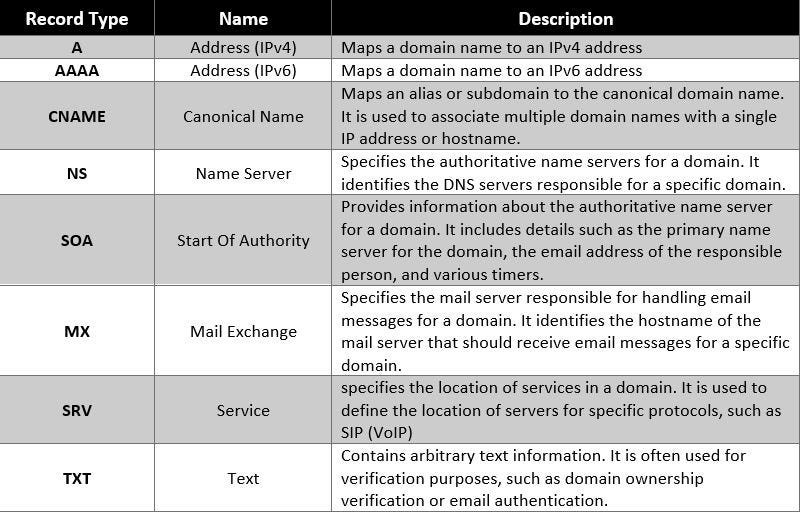
DNS records define how names map to infrastructure. Choosing the right record type affects migrations, routing, verification, and operational flexibility.
A and AAAA Records
An A record maps a domain name to an IPv4 address. An AAAA record maps a domain name to an IPv6 address.
example.com     A      203.0.113.10
example.com     AAAA   2001:db8::10
A records are simple, but they directly point to IP addresses. If infrastructure changes frequently, direct IP records can become harder to manage.
CNAME Records
A CNAME record maps one domain name to another domain name.
www.example.com  CNAME  example.com
app.example.com  CNAME  my-load-balancer.example.net
CNAME records add indirection. This is useful when the target is managed by another service, such as a CDN, load balancer, or SaaS provider.
For example, if app.example.com points to a cloud load balancer using a CNAME, the cloud provider can change the underlying IP addresses without requiring you to update your DNS record manually.
TXT Records
TXT records store text values. They are commonly used for domain verification, email security, and ownership validation.
example.com TXT "v=spf1 include:_spf.google.com ~all"TXT records are frequently used for SPF, DKIM, DMARC, Google Search Console verification, SSL certificate validation, and SaaS integrations.
Because many systems rely on TXT records, they should be documented carefully. Accidentally deleting a TXT record can break email delivery or domain verification.
MX Records
MX records define which mail servers receive email for a domain.
example.com MX 10 mail1.example.com
example.com MX 20 mail2.example.com
Lower priority values are tried first. If the primary mail server is unavailable, senders can try the next one.
TTL and DNS Caching
Time To Live, or TTL, defines how long DNS responses can be cached by resolvers and clients.
TTL is one of the most important DNS settings in system design because it controls the trade-off between cache efficiency and change speed.
Low TTL
A low TTL allows DNS changes to take effect faster. This is useful during migrations, failovers, blue-green deployments, and traffic shifting.
For example, before moving traffic from an old load balancer to a new one, a team may lower TTL from one hour to one minute. After old caches expire, switching records becomes less risky.
The trade-off is that low TTL increases DNS query volume and makes the system more dependent on DNS resolver performance.
High TTL
A high TTL improves caching efficiency and reduces DNS query volume. This is useful for stable records that rarely change.
The trade-off is slower propagation. If a record points to a bad endpoint, users may continue receiving the old answer until the cached value expires.
| TTL Strategy | Advantages | Trade-offs |
|---|---|---|
| Low TTL, 30-60 seconds | Fast failover and quick updates | Higher DNS traffic and resolver dependency |
| Medium TTL, 5-10 minutes | Balanced performance and flexibility | Moderate propagation delay |
| High TTL, 1 hour or more | Efficient caching and low DNS load | Slow change propagation |
DNS Propagation Myth
People often say “DNS propagation takes 24 hours.” In many cases, what they really mean is that cached DNS answers need time to expire.
If a resolver cached a record with a one-hour TTL, it may continue serving the old value for up to one hour. Very low TTLs can help, but some resolvers may still enforce their own caching behavior.
This is why DNS changes should be planned before critical migrations.
DNS Traffic Routing
DNS can also be used to route traffic between endpoints, regions, environments, or versions.
Round-Robin Routing
Round-robin DNS returns multiple IP addresses for the same name.
api.example.com -> 203.0.113.10
api.example.com -> 203.0.113.11
api.example.com -> 203.0.113.12
This distributes traffic in a simple way, but it is not a full replacement for a real load balancer. DNS caches can keep sending users to unhealthy endpoints until records expire.
Weighted Routing
Weighted routing sends different percentages of traffic to different targets.
90% -> old environment
10% -> new environment
This is useful for blue-green deployments, canary releases, and gradual migrations.
For example, a team can send 5% of users to a new API version, monitor errors, and then increase traffic if the deployment is healthy.
Latency and Geo Routing
Latency-based routing attempts to send users to the region with the lowest network latency. Geo routing sends users to regions based on geographic rules.
For example:
US users      -> us-east-1
Europe users  -> eu-west-1
Asia users    -> ap-southeast-1
These patterns are useful for global applications, but they are not perfect. DNS routing often depends on resolver location, not always the exact user location.
Failover Routing
Failover routing sends traffic to a backup endpoint when the primary endpoint becomes unhealthy.
Primary region healthy:
users -> us-east-1

Primary region unhealthy:
users -> us-west-2
This improves resilience, but it depends heavily on health checks, TTL settings, and application readiness in the backup region.
| Routing Policy | Use Case | Trade-off |
|---|---|---|
| Simple | Single endpoint | No traffic control |
| Weighted | Blue-green or canary deployments | Requires monitoring |
| Latency-based | Global applications | Resolver location may affect accuracy |
| Geo | Region-specific behavior | Can be less precise than application-level routing |
| Failover | Disaster recovery | Depends on health checks and TTL |
DNS in Cloud Architectures
Route53 and CloudFront Example
A common AWS architecture uses Route53 as the authoritative DNS provider and CloudFront as the public entry point.
User
  │
  ▼
Route53
  │
  ▼
CloudFront
  │
  ├── S3 static origin
  └── API Gateway origin
In this architecture, DNS resolves the domain, CloudFront handles edge caching and routing, and the origin services handle static files or API requests.
For example, sysdespro.com can point to CloudFront, while CloudFront routes static assets to S3 and dynamic requests to API Gateway.
Microservices and Service Discovery
DNS is also used for service discovery in many internal systems. Instead of hardcoding IP addresses, services resolve names.
payments.service.internal -> payment service instances
users.service.internal    -> user service instances
orders.service.internal   -> order service instances
This makes deployments and scaling easier because service instances can change while the service name remains stable.
Kubernetes DNS
Kubernetes uses DNS for service discovery inside the cluster.
payments.default.svc.cluster.localApplications can call the service name instead of tracking individual pod IPs.
However, DNS is not a real-time discovery system. During rapid scaling, rolling deployments, or pod churn, DNS caching and resolver load can become important.
import socket
import time
from typing import Optional

class DNSResolver:
    def __init__(self, retries: int = 3, backoff_seconds: float = 0.5):
        self.retries = retries
        self.backoff_seconds = backoff_seconds

    def resolve(self, hostname: str) -> Optional[str]:
        for attempt in range(1, self.retries + 1):
            try:
                return socket.gethostbyname(hostname)
            except socket.gaierror as exc:
                if attempt == self.retries:
                    raise RuntimeError(
                        f"DNS resolution failed for {hostname}"
                    ) from exc

                time.sleep(self.backoff_seconds)
Retries can help with temporary resolver failures, but they should be bounded. Infinite retries can cause request pileups and make outages worse.
Common DNS Failure Modes
Stale Records
A stale DNS record points users to an old or incorrect endpoint.
For example, after migrating from one load balancer to another, some resolvers may continue returning the old record until TTL expires.
This can cause a confusing partial outage where some users reach the new system and others still reach the old one.
Expired Domain
If a domain registration expires, the entire application may become unreachable even if all servers are healthy.
This is one of the simplest but most damaging DNS-related failures. Domains should have auto-renewal, ownership documentation, and alerts before expiration.
Resolver Failures
Sometimes the application is healthy, but the DNS resolver fails or becomes slow.
This can appear as application timeouts, upstream connection failures, or random 502 errors.
For critical services, DNS lookup latency and failure rates should be monitored like any other dependency.
Misconfigured Records
DNS misconfiguration can break websites, APIs, email delivery, SSL validation, and third-party integrations.
Common examples include:
- Wrong CNAME target.
- Deleted TXT verification record.
- Incorrect MX records.
- Old A record pointing to a removed server.
- Too-low TTL causing excessive DNS load.
Security Considerations
DNSSEC
DNSSEC helps protect DNS responses from tampering by adding cryptographic validation.
It can reduce the risk of cache poisoning, but it also introduces operational complexity. Misconfigured DNSSEC can break resolution for the domain.
Domain Hijacking
Domain hijacking happens when an attacker gains control of a domain registrar account or DNS provider account.
If that happens, the attacker can redirect traffic, intercept email validation flows, or point users to malicious infrastructure.
Registrar and DNS provider accounts should use MFA, strong access controls, limited permissions, and change auditing.
Change Control
DNS changes should be treated as production infrastructure changes.
A small manual DNS mistake can cause a major outage. For important domains, DNS changes should be reviewed, documented, and ideally managed through infrastructure as code.
| Control | Benefit | Trade-off |
|---|---|---|
| DNSSEC | Protects against DNS response tampering | Operational complexity |
| MFA on registrar | Reduces risk of domain hijacking | Requires account management discipline |
| Change auditing | Improves traceability | Slower manual changes |
| Infrastructure as code | Reviewable and repeatable DNS changes | Requires tooling and process |
Design Takeaways
DNS should not be treated as a static lookup table. It is a distributed, cached, operationally important system that affects production reliability.
- Use root domains, subdomains, and record types intentionally.
- Choose TTL values based on expected change frequency and failover needs.
- Lower TTL before migrations, not during the incident.
- Use CNAME records when infrastructure indirection is useful.
- Monitor DNS lookup latency and resolver failures.
- Protect registrar and DNS provider accounts with MFA.
- Document DNS ownership and change procedures.
Conclusion
DNS is one of the most important hidden dependencies in system design. Every web application, API, CDN, load balancer, email system, and cloud deployment depends on name resolution working correctly.
Good DNS design improves availability, deployment safety, routing flexibility, and operational recovery. Poor DNS design can create slow propagation, partial outages, security risks, and hard-to-debug production incidents.
DNS is not just about mapping names to IP addresses. It is about controlling how users reach your system, how fast changes propagate, and how safely infrastructure can evolve.


Comments (0)